
Creating a Medical Insurance Cost Dashboard with Dashtera
- Published
-
Software Developer Janaka Alwis
On this page
Introduction
Rising healthcare costs have pushed insurance companies to adopt data-driven strategies for premium pricing and risk assessment. One powerful method is leveraging visual analytics to identify key patterns behind medical expenses. In this project, I used Dashtera a no-code data visualization platform to build a comprehensive medical insurance cost dashboard.
Dataset Description
The dataset used contains a variety of demographic and health-related variables impacting medical expenses. It includes 2700 records with 7 core attributes and serves as a solid foundation for machine learning models that aim to forecast charges for new policyholders.
Dataset Source
The dataset was sourced from an open Kaggle repository under the project titled “Medical Cost Personal Datasets.”
Key Variables and Their Measurement Units
- age – Age of the individual (in years)
- sex – Gender of the individual (Male/Female)
- bmi – Body Mass Index (numeric value)
- children – Number of children/dependents covered
- smoker – Indicates whether the individual smokes (yes/no)
- region – Geographical region of the policyholder
- charges – Medical cost charged to the insurance provider (in Euro)
Ordinal Categorical Variables Added
To enhance insights, the dataset was enriched with the following categorized fields:
- Age Category – Young Adult, Adult, Middle-aged, Senior
- BMI Category – Underweight, Normal weight, Overweight, Obese I, Obese II, Obese III
- Family Size – No Children, Small Family, Medium Family, Large Family
- Charges Category – Low, Moderate, High, Very High
About Dashtera
Dashtera is a cloud-based, no-code dashboard visualization platform that empowers users to connect data from multiple sources and build insightful dashboards without writing any code. It’s designed for users across all levels of technical skill.
Main Features of Dashtera
- Connects to various data sources (CSV, Excel, APIs, etc.)
- Wide range of chart types, including statistical and technical analysis charts
- Interactive drill-down features and dynamic filters
- Shareable dashboards with flexible layouts
- Supports calculated fields and data transformations
- User-friendly drag-and-drop interface
Advantages Over Similar Platforms
- Extremely easy to learn and use – minimal technical expertise required
- Fast dashboard creation and deployment
- Suitable for both beginners and advanced users
- Offers visual analytics with minimal setup
- More lightweight and intuitive than tools like Tableau or Power BI
Medical Insurance Cost Dashboard in Dashtera
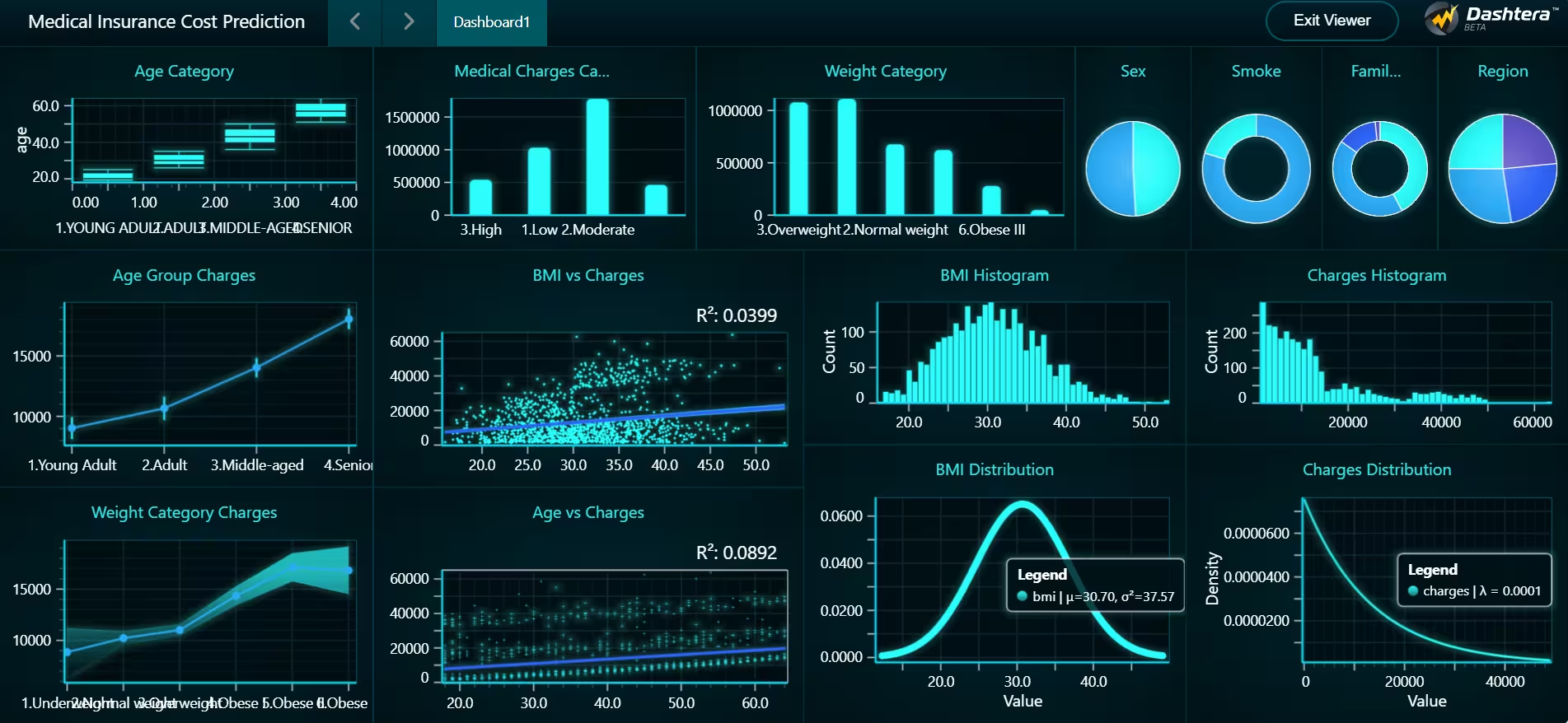
Below is the dashboard created using Dashtera for visualizing and analyzing key cost-driving factors:
Explanation of Each Chart in the Dashboard
- Age Category Box Plot
Visualizes medical charges across age categories to spot trends and variability. - Medical Charges Ranges Count Bar Plot
Displays the count of individuals falling into each charge category (Low to Very High). - Weight Category Count Bar Plot
Provides insights into the distribution of BMI categories in the dataset. - Sex Pie Chart
Shows the gender distribution of policyholders. - Smoker Donut Chart
Visualizes the proportion of smokers vs. non-smokers—critical in cost analysis. - Family Size Donut Chart
Displays the distribution across different family size categories. - Regions Pie Chart
Highlights regional distribution, useful for location-based pricing strategies. - Age Group-wise Charges Confidence Interval Chart
Displays average charges and variability across age groups. - Weight Category-wise Charges Confidence Interval Chart
Similar to age-wise analysis but focused on BMI categories. - BMI vs. Charges Linear Regression Chart
Helps identify the trend between BMI and medical expenses. - Age vs. Charges Linear Regression Chart
Shows how medical costs tend to increase with age. - BMI Histogram
Frequency distribution of BMI values across the dataset. - BMI Normal Distribution Chart
Visualizes the spread and shape of BMI using a normal distribution curve. - Charges Histogram
Shows the frequency of medical charges, highlighting skewed distribution. - Charges Distribution (Exponential)
Models the charges distribution using an exponential curve to represent the skewed cost structure.
Conclusion
Using Dashtera to analyze a medical insurance costs dashboard proved to be highly efficient and insightful. With its no-code interface, I was able to transform raw insurance data into a rich, interactive dashboard in a matter of hours.
Dashtera’s built-in statistical tools, confidence interval charts, and intuitive design allowed me to extract meaningful patterns from the dataset identifying smoking status, age, and BMI as major cost drivers. The platform’s simplicity and power make it an excellent choice for analysts and business professionals looking to communicate complex insights without programming overhead.
Whether you’re exploring data for model training or visual storytelling, Dashtera offers a streamlined solution for dashboard creation and predictive analysis.
Share:
Read More
Want to see your data come to life?
Begin building your dashboards now, and unleash your creativity!
